
We can't find the internet
Attempting to reconnect
Something went wrong!
Attempting to reconnect
A Practical LLM Map for Full-Stack Engineers
Tokens, context windows, chat memory, and four levers — prompting, RAG, agents/tools, and fine-tuning — explained for busy software engineers catching up on AI.
Part 1 of 3 · Next: LLM vocabulary →
I’m a full-stack engineer, not an ML specialist. I went through LLM engineering material because AI — and especially agentic AI — is becoming part of the job. What I wanted wasn’t a research deep-dive. I wanted clarity: how these systems actually work, what I already knew from building software, and what I still need to learn before building serious agents.
This post is a practical map of that clarity. It is written for busy software engineers who feel they have to catch up on AI basics.
What “clarity about LLMs” actually meant
A few ideas unlocked most of the confusion for me.
Tokens and the context window. Models don’t read “documents” the way we do. They process text as tokens — units that may represent pieces of words, words, punctuation, or other text. The context window is the amount of context a model can handle for a request. Depending on the model and API, system instructions, chat history, retrieved content, tool information, and the reply all consume context.
Chat is a list of messages. A typical API represents a conversation as a sequence of messages or conversation items, such as system/developer instructions, user messages, assistant messages, and tool calls/results. You send the relevant conversation state; you get the next model response back.
“Memory” is not magic. At the basic API level, a model does not automatically remember previous requests. Your application — or the API’s conversation/state mechanism — has to provide the relevant history or state. With stateless chat-style APIs, this often means resending previous messages, which consumes context and can affect cost and latency. Once you see that, a lot of chatbot architecture suddenly looks like normal backend design: what you store, what you resend, and what you truncate.
Local vs hosted. Running a model via something like Ollama on localhost vs calling a cloud API is the same mental model with different tradeoffs: privacy, cost, latency, infrastructure, and model quality. As an engineer, that felt familiar — same interface idea, different deployment.
Skills you already have
If you build APIs and UIs, more of this transfers than it first seems.
- Calling an LLM often feels like integrating another service.
- Tool definitions and structured replies lean on JSON schemas — territory frontend and backend folks already live in.
- Chat UIs, streaming responses, and model selectors are product problems you’ve solved before.
Two patterns especially clicked for me as “normal engineering”:
- Streaming: tokens arrive incrementally, like a progressive response. Better UX, same integration mindset.
- Structured output / JSON: ask for parseable objects instead of free-form text when your code needs a contract.
You don’t need to become a researcher to start. You need a map of the levers.
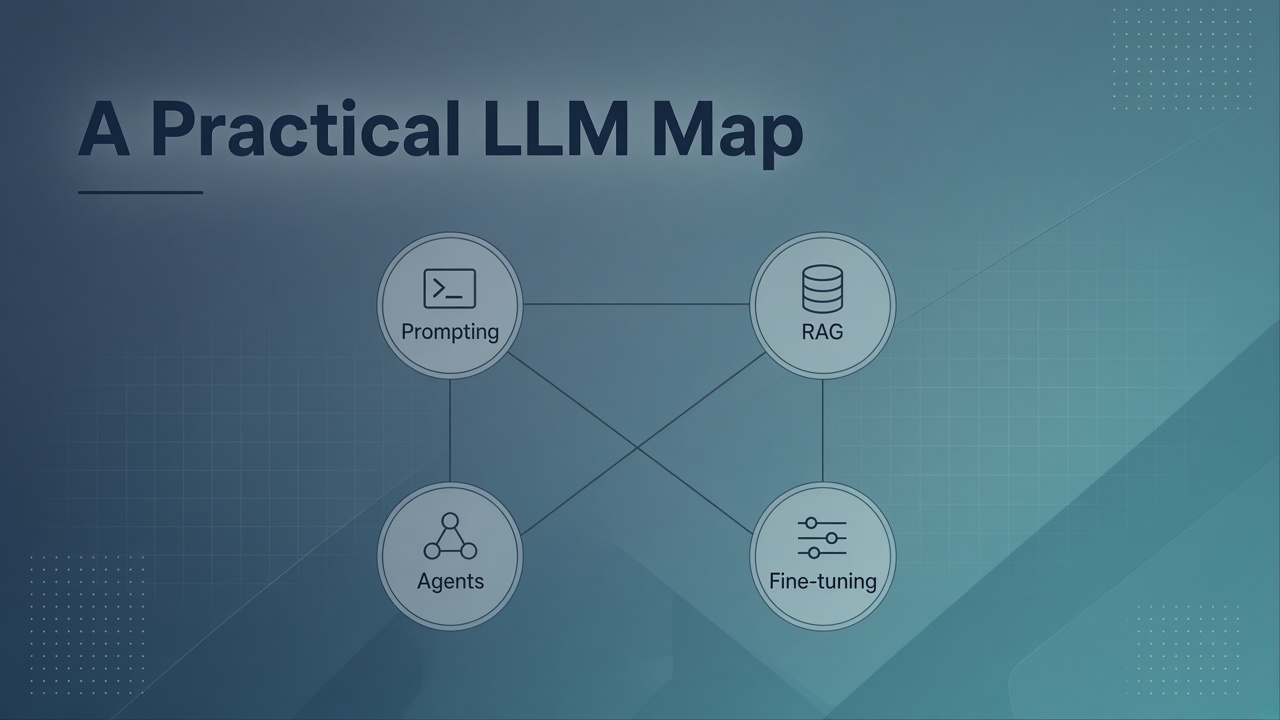
The four levers (keep this map)
For my purposes, almost everything I learned initially fit into four broad ways to improve an LLM system:
| Lever | When it runs | Idea in one line |
|---|---|---|
| Prompting | Inference | Better system/user prompts, examples, tone, structure |
| RAG | Inference | Retrieve external knowledge and provide it as context |
| Tools / Agents | Inference | Give the model access to external data or actions; an agent can use those tools across multiple steps |
| Fine-tuning | Training | Adapt model weights on your domain or task data |
These aren’t a complete taxonomy of LLM engineering, but they provide a useful practical map.
RAG, without the mystique: keep knowledge outside the model. At query time, retrieve relevant information from your docs or other sources, provide it as context, and let the model use that information when generating its answer. (Chunking, embeddings, vector DBs, and evals deserve their own deep dive later; the map only needs this shape.)
Rule of thumb for busy engineers: start with the simplest approach that meets the requirement. Prompting, RAG, and tools can often be easier to iterate on than fine-tuning. Fine-tuning becomes useful when you need more consistent style, format, task performance, or specialized behavior that inference-time techniques cannot reliably provide.
This foundation is LLM basics. Agentic AI — multi-step planning, state and memory, multi-agent workflows — builds on this map. It starts after you have clarity on the basics.
Five things to remember
- An LLM call is mostly messages/context in → model output out; “memory” is state and history your application or the API provides.
- Improve systems with four practical levers: prompting, RAG, tools/agents, fine-tuning — and evaluate the results.
- Your existing skills transfer: APIs, JSON schemas, UIs, plus streaming and structured output.
- A new vocabulary appears next (embeddings, evals, quantization, LoRA) — learn enough to follow, then go deeper.
- Tools are how a chat model can start working with external data and systems (orders, ERP, databases).
What’s next
- Post 2: The new vocabulary — embeddings, evals, quantization, LoRA — and how to study neural-net concepts without drowning.
- Post 3: Lessons from an ERPNext chatbot experiment — how tool calling makes LLMs useful with real data.
These notes draw on common LLM engineering curricula (for reference: LLM Engineering on Udemy).
Series
- A Practical LLM Map for Full-Stack Engineers (this post)
- LLM Vocabulary for Engineers: Embeddings, Evals, Quantization, and LoRA
- Tools Make the LLM Useful: Lessons from an ERPNext Chatbot Experiment